
TARILIO 2.0!
TARILIO 2.0!
New Features
- Export emails from PST files. File > Export Search Results can save the documents themselves into a folder, with emails from PST/OST files as standard .eml files or Outlook .msg files, and attachments as their own files.
- Export log. Every export or copy writes a CSV log beside the files: source file and folder, subject, sender, date, Message-ID and a SHA-256 hash of each file.
- SharePoint Online connector (sold separately). Indexes SharePoint document libraries, with fields for Site, Library, Folder, Created By and Modified By, and updates that skip unchanged files.
- AI connector (TARILIO PRO). Lets AI assistants such as Claude Desktop search your indexes and read documents (File > Connect to Claude Desktop), including a headless mode for other AI clients.
- Incremental index updates. Update now adds, changes and removes only what has changed since the last run, instead of rebuilding the whole index. Rebuild is still there when you want a fresh start. Manual or scheduled indexing.
- Plugins. Plugins add new places to index. TARILIO ships with a free Amazon S3 plugin; Plugins > Add opens the plugins folder.
- New shortcut keys. F6 copies the selected results; F7 shows the selected result in its folder.
- Document copies. An index can keep copies of its documents, so results can still be viewed when the originals are not on this computer.
- Media files. Audio, video and image files are searchable by file name and descriptive metadata. Image viewer has mouse-wheel zoom.
- Automatic matching of the UI language to Windows language in over 15 languages, adds administrator policies for IT departments, and makes many accessibility, security and stability fixes. Accessibility: WCAG 2.2 colour contrast in light or dark mode and full High Contrast themes.
Upgrading from 1.x
Install 2.0 over 1.x; your indexes, settings and serial carry over, and 1.x plugins keep working.
- Run the 2.0 installer. It replaces the installed 1.x version.
- Rebuild (Manage Indexes > Rebuild) any index that contains PST/OST files, so emails can be exported and show their own size and date.
- Rebuild any index that contains Word 97–2003 .doc files, to clear paragraph tags from their text.
- If you used scheduled updates, they now add only what has changed; no action is needed.
Release Notes are at: https://searchcloudone.com/release-notes-esearch/
Use the contact form to request early access to private betas or for quotations for quantity.
TARILO PRO 2.0 can be tried for 30-days without a serial, after 30 days it will revert to a free Lite version with some limits on results and other features. All downloads are SHA-256 encrypted password protected, contact us for a password to unzip
AI on PCs
A Look Back: When “AI on PCs” Was a Magazine Cover Story
Before AI became a household term, there was PC AI – a bimonthly magazine published by Knowledge Technology Inc. in the United States. Running from Spring 1987 to 2002, PC AI focused on practical applications of artificial intelligence, including expert systems, neural networks, and emerging technologies tailored for PC users.
Fittingly, the magazine’s very first issue featured an article titled “AI on PCs”, capturing the early excitement around bringing intelligent systems to personal computers.

Image above from [3] PC-AI Index
Our connection to PC AI comes from the May/June 1999 issue, which featured an article titled “Text Mining: Dealing with Unstructured Data.” This piece highlighted the capabilities of dtSearch, alongside an advertisement for Desktop 5.1 for Windows 95/98/NT. We produced French and German translated versions of dtSearch 6.1 and later developed the multilingual stemming files used in dtSearch products.
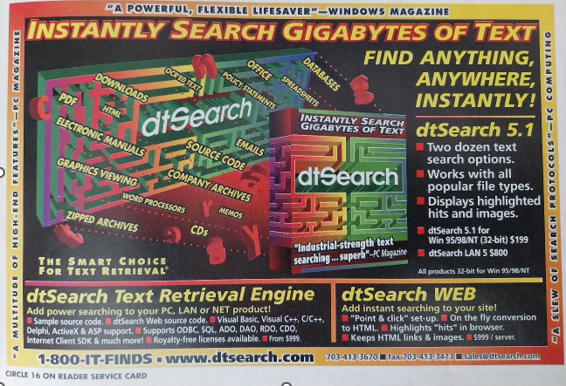
The article demonstrated how users could craft powerful search queries like:
(neural w/1 networks) and (finance or (stock w/1 market)) and (prediction or forecasting)This query would retrieve documents containing the phrase “neural networks”, along with either “finance” or “stock market”, and either “prediction” or “forecasting.” Combined with features like fuzzy searching, stemming, and other advanced options, users could sculpt highly effective searches to mine insights from unstructured data.
The software would then return a list of relevant documents, complete with previews—an early glimpse of the intelligent search experiences we now take for granted.
Why Run LLMs Locally? The Future of AI is on Your PC
Text mining is still as essential as ever—perhaps even more so. Today, information is scattered across a wider variety of formats and platforms than ever before. But the way we interact with that information has evolved dramatically. Users no longer just want a list of links—they expect to ask questions in natural language and receive clear, concise answers or even well-reasoned arguments.
Thanks to Large Language Models (LLMs), that’s now possible.
LLMs have become the face of AI for most people. When we talk about “AI on a PC,” what we really mean is “LLMs on a PC.” However, accessing cutting-edge LLMs online can be expensive – some frontier models cost upwards of $200/month. Even “free” AI chat apps often come with frustrating limitations on usage, conversation length, or speed.
But what if you could run powerful LLMs locally, right on your home or office network?
Imagine having:
- No subscriptions
- No usage limits
- Full privacy—your data never leaves your device
- Freedom to experiment with different models for different tasks
The good news? You can. With today’s hardware and open-source tools, setting up multiple LLMs on a modern PC is not only possible – it’s surprisingly straightforward.
So why wait? Here’s a step-by-step guide to running multiple LLMs on a small office network
If you need help along the way, we’re here for you.
Useful links::
1 – PC AI website archived.
https://web.archive.org/web/20250320212434/http://pcai.com/
2 – Volume 15, Issue 6 November 2001 Final Issue
https://dl.acm.org/toc/pcai/2001/15/6
3 – PC AI Article Index https://web.archive.org/web/20240920060047/http://www.pcai.com/web/PC%20AI_2002_Article_Index-16.6.pdf
Free S3 Indexer Plugin
A free ‘S3 demo’ plugin is now available for immediate download. The plugin allows eSearch Pro (1.1.9225 and later and TARILIIO) to index files stored in an Amazon S3 bucket.
TARILIO is an AI-powered information retrieval application with a UI that can be translated into any language. Developers can create other plugins to connect to data sources like Microsoft OneDrive and Dropbox using the plugin API.

Download the plugin and the latest copy of TARILIO from here: https://tarilio.com/product/s3-plugin-for-tarilio/
TARILIO combines AI-powered web search with comprehensive indexed search using the open-source Lucene engine. Advanced features include a word list of all the words in your documents, syntax highlighting on source code and JSON files. Support for image display with geolocation tags to display location in the viewer, Jupiter Notebooks, ePub and JSONL file support.
eSearch Pro updated
The new version offers faster indexing of email (.eml) files and includes a ‘copy files’ feature that can export results, including eml files and their attachments. The AI Mode introduces several new features to enhance the AI-powered web search experience. See the release notes for version 1.0.9190 below:
Added:
- AI Mode: Cancel button added in viewer to cancel long running chats.
- Copy File: Copies attachments into a folder under the destination folder.
- Copy File… button on results task bar.
- New email (.eml) parser. Unfiltered attachments will also show in index (Requires rebuild of old indexes)
Changes:
- AI Mode: at start-up, the last query will be displayed but not submitted, allowing users to pickup where they left off if they want to.
- CTRL+A selects all results and checks all checkboxes.
- AI Mode: connection timeout increased to 10 mins.
Free download here now . Choose quick checkout and just enter your email address!
UPDATE November 2025: eSearch Pro is now TARILIO, open source and FREE for personal use.
TARILIO PRO is for commercial use with full support. TARILIO can be used for commercial 30-day trial usage, before purchasing TARILIO PRO.

New eSearch Pro beta – multiple AI models
eSearch Pro 1.0.9183 is available for download here: eSearch Pro Click Quick Checkout.
This latest version now supports multiple connections to all Perplexity real-time web search models, as well as connections to other online OpenAI-compatible models, including those accessible via local URLs.
UPDATE November 2025: eSearch Pro is now TARILIO!
TARILIO is open source and FREE for personal use. TARILIO PRO is for commercial use.
Beta testers wanted! contact support@electronart.co.uk to get latest information.
The open source project is on GitHub and full information is on the GitHub project Wiki.
This demo page was created with the Search Cloud One WordPress plug-in, no programming was needed.
It demonstrates the use of filters to narrow the search without having to type a long query such as Title contains (Smith v Cotoco Freezing company) or Date Of Judgment contains (2016/01/21).
 Try clicking the filter in the search bar, enter a Date of Judgment of 21 Jan 2016, click Apply.
PDF files were uploaded with custom properties created in Adobe Acrobat called Date of Judgment and Case Title. The files are automatically converted by Search Cloud One to HTML to allow multi-color hit-highlighting.
Try a search for – holden and fashion and ashi – click on the search result to view the document with each word of the search in a different color.
The 20 files in this demo are a small sample donated by Toma Legal Retrieve from their large collection of over 30,000 documents.
Other Search Demo pages
Classics – basic Boolean search
Cars Demo – faceted search